系统相关
系统安装工具
-
系统安装、刻录工具 U启动盘制作工具rufus WTG辅助工具wtg-assistant
-
bootcamp蓝牙鼠标连不上 重置SMC,关机,control➕option➕shift➕电源for10s,再开机
Mac两个bin目录
相同点
/usr/bin和/usr/local/bin都是用来存储终端命令二进制文件或者命令的软链接 这两个bin目录都是已经包含在环境变量里的目录,程序放在里面或者链接到里面命令就可以在终端里直接执行。
不同点
Mac的/usr/bin目录是不允许增删文件的,/usr/local/bin增删文件来实现在终端里直接运行,只需要有管理员权限。
Terminal——终端
-
系统允许任何来源安装包
sudo spctl --master-disable -
使其变为可执行脚本
chmod u+x filename -
更改skim背景色
defaults write -app skim SKPageBackgroundColor -array 0.78 0.93 0.8 1 -
命令行压缩加密压缩包 压缩文件
zip -e test.zip test.txt压缩文件夹zip -er test.zip test -
读写ntfs 文件灰色,无法打开,拷贝
xattr -d com.apple.FinderInfo filepath -
跳过验证dmg
xattr -d com.apple.quarantine '/Applications/Xcode.app' -
mac10.15软件安装提示已损坏解决办法 终端执行
sudo xattr -r -d com.apple.quarantine /Applications/Sketch.app/- 编辑环境变量文件文件
vim .bash_profile粘贴入下列代码
# proxy list
alias proxy='export all_proxy=socks5://127.0.0.1:1086'
alias unproxy='unset all_proxy'
control + c 键入wq保存退出 保存隐藏文件到环境变量
source .bash_profile-
系统环境变量 修改
~/.bash_profile -
添加软链接,对终端等命令皆有效 把后者链接到前者,详细参考
ln -s /Library/Frameworks/Python.framework/Versions/3.x/bin/pip /usr/local/bin/pip3
咳血上网
- HJF-ZCSSR订阅购买网站
- 订阅地址:
- ssr订阅:
https://n55.pw/link/PgKooWdckjZl5hf⑧ - clash订阅:
https://n55.pw/link/PgKooWdckjZl5hf⑧?clash=① - 节点测速链接
- Netflix
- speedtest
iTerm2
配置免密登录ssh
-
- 创建脚本文件如下
#!/usr/bin/expect

set ip [lindex $argv 0]
set user [lindex $argv 1]
set password [lindex $argv 2]

set timeout 10
spawn ssh $user@$ip
expect {
        "*yes/no" {send "yes\r";exp_continue}
        "*password:" {send "$password\r"}
}
interact
上述三个argv是变量传参的接口
-
- 配置iterm2的profile
在配置iterm2(iTerm2 -> Preferences -> Profiles)
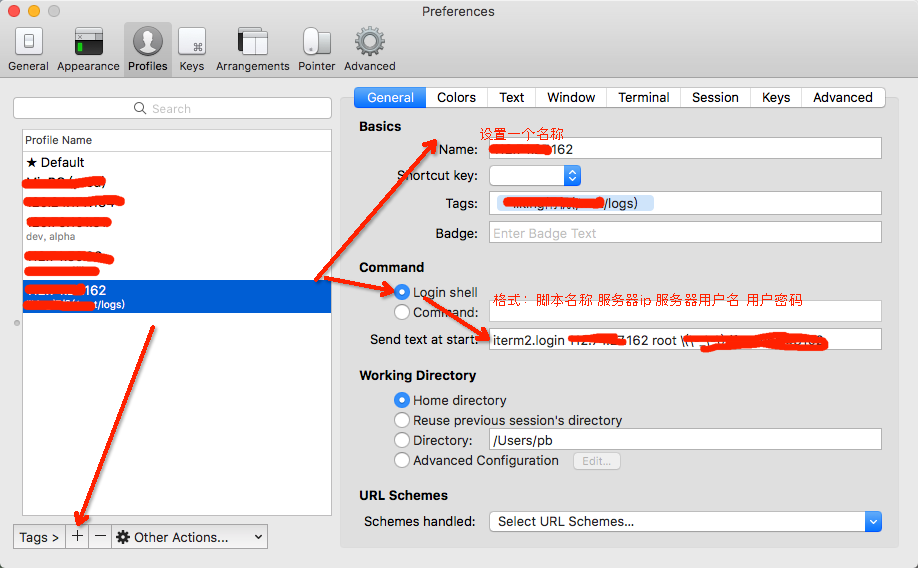
-
- 在profiles选项卡选择对应配置文件登录
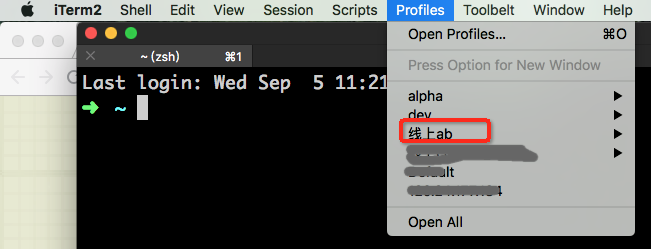
hosts修改
shift+command+G
前往
/private/etc/
Mac系统插件推荐
Mac OS X 11中的/usr/bin 的“Operation not permitted”
https://www.jianshu.com/p/22b89f19afd6
设置mac PATH
在mac系统下打开终端,输入:
touch .bash_profile open -e .bash_profile
这样会弹出一个“.bash_profile”文件.
打开文件后应该是空白的,在文件中添加:
export PATH=${PATH}:????
其中????代表你电脑中adb文件的路径,本人的配置文件如下:
export PATH=${PATH}:~/Library/Android/sdk/platform-tools
添加完后,保存并关闭文件,至此,adb配置完毕。
前往网上邻居
finder目录command+K
One cloud:
smb://192.168.31.200
mac除了magicmouse外,蓝牙鼠标发飘,延迟的问题
- 打开“系统偏好设定”,然后点击下面的“网络”图标,打开“网络”设定界面。在这里,一般会看到三个:wi-fi、蓝牙、Thunderbolt 网桥三个连接。
- 在“网络”窗口的左下角,会看到三个图标:“+”、“-”,最后一个是齿轮。点击这个齿轮,选择“设定服务顺序”
- 用鼠标点按住蓝牙PAN,往上拖到第一的位置,保存、应用。
Terminal commands
图片本地压缩工具:imageoptim aaa.jpg
开源软件安装:brew install example
python库安装pip3 install example
最后更新配置的环境变量source .bash_profile
同理:http代理设置如下:
- 让终端走http代理——应用层,不改变系统层
export http_proxy="http://localhost:1087"
export https_proxy="http://localhost:1087"
brew 源替换清华 git 太慢的解决办法
- 在https://www.ipaddress.com/查询网址对应ip
- 手动更改hosts
199.232.68.133 raw.githubusercontent.com
199.232.69.194 github.global.ssl.fastly.net
140.82.114.4 github.com-
刷新dns缓存
sudo dscacheutil -flushcache -
git 代理设置 手动操作
- 设置
git config --global http.proxy socks5://127.0.0.1:1086;
git config --global https.proxy socks5://127.0.0.1:1086- 卸载
git config --global --unset http.proxy
git config --global --unset https.proxy- 写入命令行vim添加:
alias git_proxy='git config --global http.proxy socks5://127.0.0.1:1086; git config --global https.proxy socks5://127.0.0.1:1086'
alias ungit_proxy='git config --global --unset http.proxy; git config --global --unset https.proxy'
查看是否添加上:
cat ~/.gitconfig
- brew源更改(采用阿里云)
cd "$(brew --repo)"
# 查看远程仓库
git remote -v
# 删除远程
git remote rm origin
# 添加阿里源 :
git remote add origin https://mirrors.aliyun.com/homebrew/brew.git
# 切换成阿里源:
git remote set-url origin https://mirrors.aliyun.com/homebrew/brew.git- brew-core源更改
cd "$(brew --repo)/Library/Taps/homebrew/homebrew-core"
# 查看远程仓库
git remote -v
# 删除远程:
git remote rm origin
# 添加阿里源 :
git remote add origin https://mirrors.aliyun.com/homebrew/homebrew-core.git
# 切换成阿里源:
git remote set-url origin https://mirrors.aliyun.com/homebrew/homebrew-core.git- bottle源更改
echo 'export HOMEBREW_BOTTLE_DOMAIN=https://mirrors.aliyun.com/homebrew/homebrew-bottles' >> ~/.bash_profile
source ~/.bash_profile- cask源更改(中科大源)
cd "$(brew --repo)"/Library/Taps/homebrew/homebrew-cask
git remote rm origin
git remote add origin https://mirrors.ustc.edu.cn/homebrew-cask.git
git remote set-url origin https://mirrors.ustc.edu.cn/homebrew-cask.git- 环境变量设置,快捷命令设置
自己在 ~/.bash_profile 中配置环境变量, 可是每次重启终端后配置的不生效.需要重新执行
$source ~/.bash_profile发现zsh加载的是 ~/.zshrc文件,而 ‘.zshrc’ 文件中并没有定义任务环境变量。 解决办法
在~/.zshrc文件最后,增加一行:
source ~/.bash_profile
UEFI多系统引导工具
- clover
- rEFInd:
- grub4dos
Finder
- 显示隐藏文件:shift + Command + .
硬盘
ntfs原生挂载
terminal:
sudo nano /etc/fstab
LABEL=Elements\040SE none ntfs rw,auto,nobrowse
\040代表空格
ctrl + x 保存,y确定
外接硬盘无法挂载
需要先进行检查修复
diskutil list
diskutil repairVolume /dev/disk4
diskutil mount /dev/disk4
Coding
Latex
- 文献不引用编译会报错,修正方法,clean过程文件,重新编译
- mac vs code 改编译器
- mac vs_code skim_pdf_viewer设置
- vscode-skim正向同步:命令行,sync from cursor,快捷键option+command+J
- vscode-skim反向同步:shift+command+click
- vscode-编译:command + shift + B
- xelatex编译慢的解决办法,重建字体缓存
fc -cache -fv
Mac中输入latex公式,用mathtype编译
mac word 中键入latex公式 输入格式如下 按下option(alt)+\,mathtype会编译,并且可以修改
其他插件-多数可见
pdf: PDF Expert、skim 远程控制: AnyDesk 文献管理: Mendeley Desktop 编程学习: Code Runner 翻墙: xx.net Markdown:MWeb,使用说明 safari 插件:polyglot,双击选中翻译
Python
- matplotlib官网
- VSCODE,编译器选Python3,设置路径
- mac上使用virtualenv搭建多个python环境
- Python3.x.x后安装pip出现command not found 错误http://blog.csdn.net/llh_1178/article/details/77948568
- Matplotlib论文格式python plot
pip install git+https://github.com/garrettj403/SciencePlots.git - python3 matplot修改中文字体 以下内容只针对mac os x ,亲测有效
1.从mac字体目录/System/Library/Fonts
添加SimHei字体(simhei.ttf文件)到
/usr/local/lib/python3.7/site-packages/matplotlib/mpl-data/fonts/ttf/xxx.ttf
2.rm -rf ~/.matplotlib/*.cache
注意rm -rf命令,确认路径没错在用设置matplotlib使用的字体资源
我是直接重命名的方式,避免出错。
3.
代码中添加
mpl.rcParams['font.sans-serif'] = u'SimHei'
[更改字体](https://blog.csdn.net/gmr2453929471/article/details/78655834)- 编辑器
jupyter notebook升级为jupyter lab支持python kite代码补全
黑苹果安装
- 聪聪黑苹果一键安装工具
- clover停更了,现在用opencore
Something interesting
US-fake信息
https://www.fakenamegenerator.com/index.php#
mac手柄ps3 controller
-
dualshock 3 panhai controller https://gist.github.com/OlesenkoViktor/32c700e025bf4567db8feb1ed467f8ee
最后发现,先启动retroarch之后,手柄就可以在openemu等平台使用
mac——安卓刷机
android adb 黑域
adb devices adb -d shell sh /data/data/me.piebridge.brevent/brevent.sh
fastboot模式:adb reboot bootloader
TWRP下载地址:第三方recovery root 管理器:magisk